Difference between Static and Dynamic IP address
What is an IP Address?
IP ka full form hai Internet Protocol. IP address ek unique identifier hota hai jo har device ko network par diya jata hai. Jab hum devices ke internet se connect hone ki baat karte hain, ya network me communication ki baat karte hain, toh IP address ko basic understanding ke roop me consider kiya jata hai.
Static IP Address vs. Dynamic IP Address
Static IP Address:
-
- Fixed Address: Static IP address ek fixed address hota hai jo manually ek device ko diya jata hai aur yeh address lambe samay tak same rehta hai. Yeh un devices ke liye zaruri hota hai jo constant address require karte hain, jaise servers.
Dynamic IP Address:
-
- Changing Address: Dynamic IP address har baar device restart hone par automatically change hota hai. Yeh address ek address pool se assign kiya jata hai, usually Dynamic Host Configuration Protocol (DHCP) ke through.
- Frequent Changes: Yeh type ka IP address un devices ke liye hota hai jo permanent address ki zarurat nahi rakhte, jaise consumer devices (smartphones, laptops).

What is Static IP Address?
Static IP address ek aisa IP address hota hai jo frequently change nahi hota. Yeh ek specific device ke liye reserved hota hai, jo manually assigned hota hai. Static IP address ko tab tak change nahi kiya jata jab tak user ya network administrator manually na kare. Static IP addresses servers, network devices, ya un devices ke liye common hote hain jinko fixed address chahiye hota hai jo remotely access kiya ja sake.
How to Get a Static IP Address?
Static IP address ke liye aap Internet Service Provider (ISP) se apply kar sakte hain. ISP static IP provide karta hai, lekin yeh additional cost ke saath aata hai. Agar aapke paas apna physical network infrastructure hai, toh aap device ke settings ke through static IP assign kar sakte hain.
When are Static IPs Needed?
Static IP addresses zaruri hote hain jab ek device ko permanently internet par locate karna ho.
- Web Servers: Website ko static IPs ki zarurat hoti hai taaki domain hamesha correct server ko point kare.
- Remote Access: Devices like CCTV cameras ya VPN ko static IPs ki zarurat hoti hai, taaki remote connection stable rahe.
- Hosting Servers: Game ya email servers ko bhi static IPs chahiye hoti hain taaki services properly run kar sakein.
- Secure Communications: Kuch devices ko stable aur reliable secure communications ke liye static IP ki zarurat hoti hai.
What is Dynamic IP Address?
Dynamic IP address ek aisa IP address hota hai jo time ke saath change hota rehta hai. Yeh DHCP server (Dynamic Host Configuration Protocol) ke through automatically assign hota hai. Jab device ko IP assign hota hai, toh woh lease time ke liye hota hai aur connection band hone par IP address change ho sakta hai.
How to Get a Dynamic IP Address?
Dynamic IP addresses ko ISP aapko randomly aur connection ke basis par assign karta hai. Aapko koi specific request nahi karni padti, kyunki most ISPs default me dynamic IPs offer karte hain. Jab bhi aap koi connection launch karte hain, DHCP server automatically available IP assign kar deta hai.
Difference Between Static and Dynamic IP Address
| Static IP Address | Dynamic IP Address |
|---|---|
| Provided by ISP: Static IP address ISP se directly milta hai. | Provided by DHCP: Dynamic IP address DHCP (Dynamic Host Configuration Protocol) ke through assign hota hai. |
| Unchanged: Static IP address kabhi change nahi hota. Agar assign kiya gaya hai, toh woh permanent rehta hai. | Changes Regularly: Dynamic IP address time-to-time change hota hai, aur har baar connection restart hone par new IP milta hai. |
| Less Secure: Static IP address thoda less secure hota hai, kyunki ek permanent address ke saath device easily trace ho sakta hai. | More Secure: Dynamic IP address zyada secure hota hai, kyunki yeh regularly change hota hai, isliye trace karna difficult hota hai. |
| Difficult to Designate: Static IP address ko assign karna thoda complicated hota hai. | Easy to Designate: Dynamic IP address ko assign karna easy hota hai, kyunki woh automatically milta hai. |
| Traceable: Static IP address ko easily trace kiya ja sakta hai, kyunki woh fixed hota hai. | Not Easily Traceable: Dynamic IP address ko trace karna mushkil hota hai, kyunki woh change hota rehta hai. |
| More Stable: Static IP address kaafi stable hota hai, aur device ka address hamesha same rehta hai. | Less Stable: Dynamic IP address thoda kam stable hota hai, kyunki woh change hota rehta hai. |
| Higher Maintenance Cost: Static IP address ko maintain karna costly hota hai. | Lower Maintenance Cost: Dynamic IP address ki maintenance cost kam hoti hai, kyunki woh automatically assign hota hai. |
| Used for Less Confidential Data: Static IP address ko un situations mein use kiya jata hai jahan data utna confidential nahi hota. | Used for More Confidential Data: Dynamic IP address ko un situations mein use kiya jata hai jahan data ko high security ki zarurat hoti hai. |
| Simplifies Troubleshooting: Static IP address se troubleshooting easy hoti hai, kyunki IP address hamesha same rehta hai. | Increases Troubleshooting Complexity: Dynamic IP address se troubleshooting thoda complex ho sakta hai, kyunki address change hota rehta hai. |
Internet Service Provider (ISP)

What is Networking ?
What is Networking ?
Networks simply connected cheezein hoti hain. Example ke liye, tumhara doston ka ek friendship circle socho—tum sab ek dusre se connected ho common interests, hobbies, skills ya kisi aur wajah se.
Networks Har Jagah Hain!
Life ke har area me networks ka concept dekhne ko milta hai:
Ek shehar ka public transport system (Buses, metros connected hote hain)
Electricity ka national power grid (Jo har ghar ko bijli supply karta hai)
Apne padosiyon se milna-julna (Ek social network)
Postal system (Jo letters aur parcels deliver karta hai)
Computing me Networking
Computing me bhi networking ka wahi concept hota hai, bas technological devices ke beech apply hota hai.
Tumhare phone ka kaam hi ye hai ki tumhe different networks access karne de.
Computing networks 2 devices se lekar billions tak ho sakti hain!
Ye networks laptops, phones, security cameras, traffic lights, even farming me bhi use hote hain.
Networking Ki Importance
Aaj ke modern world me networks har jagah hain:
Weather ka data collect karne ke liye
Gharon tak electricity deliver karne ke liye
Traffic signals control karne ke liye
Cybersecurity me networking ek essential concept hai, kyunki har digital system kisi na kisi tarike se kisi aur system se connected hota hai.
Example: Alice, Bob aur Jim ka apna ek network ban gaya hai! Hum is topic ko aage detail me samjhenge.
Different Types of Networks
Networks alag-alag shapes aur sizes me aate hain, aur is module me hum unko bhi explore karenge! 🚀
What is the Internet ?
Ab jab humein samajh aa gaya hai ki network kya hota hai aur computing me ise kaise define kiya jata hai (basically connected devices), to chalo Internet explore karte hain!
Internet – Ek Bada Network of Networks
Internet ek gigantic network hai jo chhoti-chhoti multiple networks ko connect karta hai.
Agar pichle example se samjhein, to maan lo Alice ne naye dost banaye hain – Zayn aur Toby, aur wo unko Bob aur Jim se milwana chahti hai.
Problem yeh hai:
Alice hi ek aesi person hai jo Zayn aur Toby ki language samajhti hai.
Bob aur Jim unki language nahi samajh sakte.
Isliye, Alice ko messenger (translator) banna padega jo dono groups ko connect kare!
Yeh bilkul waise hi hai jaise routers aur servers kaam karte hain internet pe – alag-alag networks ko connect karne aur sahi tareeke se communication establish karne ke liye! 🌐

Kyunki Alice dono languages bol sakti hai, woh ek dusre se Alice ke through communicate kar sakte hain — ek naya network banate hue.
Internet ka pehla iteration 1960s ke end mein ARPANET project ke andar shuru hua tha. Yeh project United States Defence Department ne fund kiya tha aur yeh pehli baar documented network ke roop mein kaam kar raha tha. Lekin, jo Internet aaj hum jaante hain, woh 1989 mein Tim Berners-Lee ne World Wide Web (WWW) create karke invent kiya. Isi point ke baad Internet ek repository ban gaya jisme information store aur share ki ja sakti thi, jaise ki aaj hota hai.
Chalo, Alice ke friends ka network computing devices se relate karte hain. Internet kuch is type ke diagram ka ek kaafi bada version lagta hai:

Jaise pehle bataya gaya tha, Internet kai chhoti-chhoti networks se milkar bana hai jo ek dusre se connected hote hain. Yeh chhoti networks private networks kehlate hain, jabki jo networks in private networks ko connect karte hain, unhe public networks ya simply Internet kaha jata hai!
Toh, ek network do tarike ka ho sakta hai:
Private Network
Public Network
Devices apne aapko network par identify karne ke liye ek set of labels ka use karti hain, jiske baare mein hum agle task mein dekhenge.
Identifying Devices on a Network ?
Communicate karne aur order maintain karne ke liye, devices ko network par identify karna aur identifiable hona zaroori hai. Agar aapko pata hi na ho ki aap kisse baat kar rahe ho, toh iska kya fayda?
Network par devices insaanon ki tarah hi kaam karti hain, jisme do tareeke se unhe identify kiya ja sakta hai:
Hamara Naam ( Our Name )
Hamari Fingerprints ( Our Fingerprints )
Hum apna naam toh change kar sakte hain, lekin fingerprints kabhi change nahi hote. Har insaan ke fingerprints unique hote hain, jo uski asli identity ko represent karte hain, chahe naam badal bhi jaye. Devices ke case mein bhi do identification methods hote hain—jisme se ek change ho sakta hai, aur ek nahi. Yeh hain:
IP Address
MAC (Media Access Control) Address – Isse ek serial number ki tarah samajh sakte ho.
IP Addresses
IP Address (Internet Protocol Address) ek temporary identity hoti hai jo kisi network par host ko identify karne ke liye use ki jati hai. Yeh ek aisa label hai jo kuch time ke liye ek device ke saath associated hota hai, lekin baad mein kisi aur device ko assign ho sakta hai.
Chalo, ek diagram ke through samajhte hain ki IP Address actually hota kya hai:
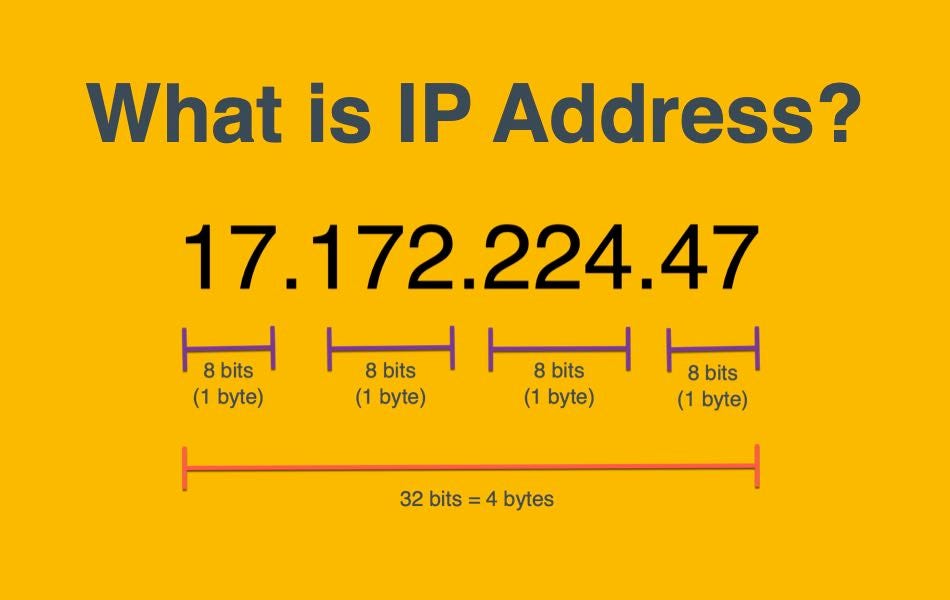
Ek IP address ek set of numbers hota hai jo chaar octets me divide hota hai. Har octet ki value milkar device ka unique IP address banati hai jo us network par use hota hai. Yeh number ek technique se calculate kiya jata hai, jise IP addressing & subnetting kehte hain, par iske baare me hum baad me padhenge.
Yeh samajhna zaroori hai ki IP addresses device se device change ho sakte hain, lekin ek hi network ke andar ek IP address ek hi time par sirf ek hi device ko assign hota hai.
IP Addresses aur Protocols
IP addresses ek protocol standard follow karte hain, jo networking ka backbone hai. Yeh protocols ensure karte hain ki saari devices ek common language me communicate karein.
Devices private aur public network dono par ho sakti hain, aur unka IP address bhi network type par depend karta hai:
Public IP Address – Internet par ek device ko identify karne ke liye use hota hai.
Private IP Address – Kisi local network ke andar ek device ko identify karne ke liye use hota hai.
Example Table
Niche diye gaye example me do devices ek private network par connected hain, aur unke public aur private IP addresses diye gaye hain:
| Device Name | IP Address | IP Address Type |
|---|---|---|
| DESKTOP-KJE57FD | 192.168.1.77 | Private |
| DESKTOP-KJE57FD | 86.157.52.21 | Public |
| CMNatic-PC | 192.168.1.74 | Private |
| CMNatic-PC | 86.157.52.21 | Public |
Is table me dono devices ke private IP addresses alag hain, jo unko local network me identify karte hain. Lekin dono ka public IP address same hai, kyunki ek router ke through multiple devices ek hi public IP address share karti hain jab Internet se connect hoti hain.

Ye dono devices apne private IP addresses ka use karke ek dusre se communicate kar sakti hain. Lekin, agar inme se koi bhi Internet par data bhejta hai, toh dono devices ek hi public IP address se identify hongi.
Public IP addresses aapke Internet Service Provider (ISP) dwara diye jate hain, jo aapke monthly bill ka ek part hota hai!

Jaise jaise zyada devices Internet se connect ho rahi hain, ek unique public IP address milna mushkil hota ja raha hai. Example ke liye, Cisco ne estimate kiya tha ki 2021 tak 50 billion se zyada devices Internet se connected hongi (Cisco, 2021).
IP Address Versions
Ab tak humne IPv4 ke baare me baat ki hai, jo ek 2³² numbering system use karta hai (matlab sirf 4.29 billion unique IP addresses available hain). Isi wajah se IP address ki shortage ho rahi hai.
IPv6 ka Solution
Is issue ko solve karne ke liye IPv6 introduce kiya gaya hai. IPv6 kaafi powerful hai aur yeh kuch important benefits deta hai:
2¹²⁸ (340 trillion+) IP addresses support karta hai, jo IPv4 ki shortage ka solution hai.
Naye methodologies ki wajah se zyada efficient hai.
Niche diye gaye screenshot me IPv4 aur IPv6 addresses ka comparison dikhaya gaya hai.

MAC Address kya hota hai?
Har device jo kisi network se connect hoti hai, uske paas ek physical network interface hota hai. Ye ek microchip board hota hai jo device ki motherboard par laga hota hai.
Jab ye network interface factory me banaya jata hai, tab usko ek unique MAC (Media Access Control) address assign kiya jata hai.
MAC Address ka Format
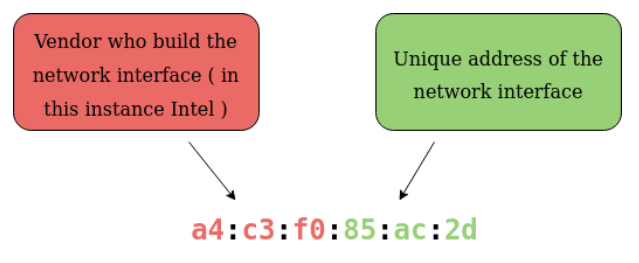
MAC address ek 12-character hexadecimal number hota hai (jo base-16 numbering system use karta hai). Iska format kuch iss tarah hota hai:
a4:c3:f0:85:ac:2d
Pehle 6 characters → Manufacturer ka identifier (Jo company ne network interface banaya hai)
Aakhri 6 characters → Device ka unique identifier
Colons (:) separators ke taur par use hote hain jo address ko easily readable banate hain.
MAC Address Spoofing
Ek interesting baat MAC addresses ke saath ye hai ki inko fake ya spoof kiya ja sakta hai. Is process ko MAC Spoofing kehte hain.
MAC Spoofing kaise kaam karta hai?
Jab koi device apna MAC address badal kar kisi doosri device ka MAC address use karti hai, toh wo network par us doosri device ki tarah dikhai deti hai. Agar security poorly implemented hai, toh yeh spoofing bypass ho sakti hai.
Example:
Ek firewall ko is tarah configure kiya gaya hai ki sirf administrator ke MAC address se aane wale traffic ko allow kare. Agar koi attacker us MAC address ko spoof kar de, toh firewall ko lagega ki administrator hi communicate kar raha hai, jabki aisa nahi hoga.
Public Wi-Fi aur MAC Spoofing
Cafes, coffee shops, aur hotels me Guest ya Public Wi-Fi ke liye MAC address control ka use hota hai.
Example ke liye, hotel ka Wi-Fi system paid users ko faster connection ya exclusive access de sakta hai.
Agar ek user Alice ne Wi-Fi ka access pay kiya hai, toh uska MAC address allow kiya jayega.
Bob, jisme Wi-Fi ka access nahi hai, agar Alice ka MAC address spoof kar de, toh Bob bina pay kiye bhi Alice ki tarah access le sakta hai.
Practical Lab
Is lab me hotel ka Wi-Fi simulate kiya gaya hai:
Bob ka traffic (blue) block ho raha hai, kyunki usne Wi-Fi pay nahi kiya.
Alice ka traffic (green) allow ho raha hai, kyunki usne Wi-Fi access pay kiya hai.
Bob ka MAC address Alice ka MAC address se replace karke dekho aur dekho kya hota hai!
Lab deploy karo aur neeche diye gaye questions ke answers do. 🚀


Ping (ICMP)
Ping ek basic network tool hai jo humein available hota hai. Ping ICMP (Internet Control Message Protocol) packets ka use karta hai taaki do devices ke beech connection ka performance check kiya ja sake, jaise ki connection exist karta hai ya reliable hai ya nahi.
ICMP packets ko ek device se doosre device tak jane me jo time lagta hai, usko ping measure karta hai. Yeh measurement ICMP ke echo packet aur phir target device se ICMP echo reply ke through hota hai.
Ping ko kisi bhi network ke devices, jaise ki aapke home network ya phir kisi website ke against perform kiya ja sakta hai. Yeh tool easily use kiya ja sakta hai aur Linux aur Windows jaise Operating Systems (OSs) me by default installed hota hai. Ek simple ping perform karne ke liye syntax hota hai:
ping <IP address ya website URL>
Chaliye, screenshot me dekhte hain ki yeh kaise kaam karta hai!
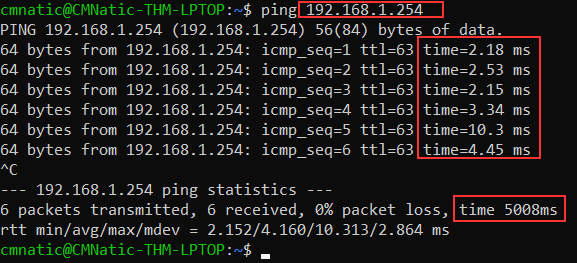
Yahan hum ek device ko ping kar rahe hain jiska private address 192.168.1.254 hai. Ping humein batata hai ki humne 6 ICMP packets bheje the, jo sabhi successfully receive ho gaye, aur inka average response time 4.16 milliseconds tha.
Ab aapko wahi process 8.8.8.8 address ke saath karna hai deployable website par. Agar aap sahi address ko ping karenge, toh aapko ek flag milega, jise aap neeche diye gaye question ka answer dene ke liye use kar sakte hain. 🚀
Questions and Answers :
Ping command ka basic purpose kya hota hai?
→ Ping command kisi bhi network device ya server ke saath connectivity check karne ke liye use hoti hai.Ping kis protocol ka use karta hai?
→ Ping ICMP (Internet Control Message Protocol) ka use karta hai.ICMP me echo request aur echo reply ka kya role hota hai?
→ Echo request ek device se bheja jata hai aur echo reply target device se aata hai, jo batata hai ki connection exist karta hai ya nahi.Ping ka use karke kisi website ka IP address kaise find kar sakte hain?
→ Command:ping website.com(Jaiseping google.com)
→ Isse aapko us website ka IP address milega.Ping request ka reply na aane ke possible reasons kya ho sakte hain?
Destination device off ho sakti hai
Network me firewall ICMP packets ko block kar raha ho
Target machine ICMP request ko disable karke rakhi ho
Windows aur Linux me ping command ka output kaise different hota hai?
Windows: Default 4 packets bhejta hai
Linux: Infinite ping send karta hai (use
Ctrl+Cto stop)
Continuous ping kaise perform kiya jata hai?
Windows:
ping -t <IP>Linux:
ping <IP>(by default continuous hota hai)
Ping flood attack kya hota hai aur iska network par kya impact padta hai?
→ Jab attacker continuous ICMP request bhejta hai taaki target server overloaded ho jaye aur bandwidth consume ho.TTL (Time to Live) ka kya significance hota hai ping response me?
→ TTL batata hai ki ek packet kitne routers cross kar sakta hai before getting discarded.Ping me latency aur packet loss kaise analyze karte hain?
→ Ping response time (ms) latency batata hai, aur agar sent aur received packets same nahi hain, toh packet loss ho raha hai.
IP Address Related Questions and Answers:
Public aur Private IP addresses me kya difference hota hai?
Public IP: Internet par directly accessible hoti hai.
Private IP: Sirf local network me use hoti hai (192.168.x.x, 10.x.x.x, 172.16.x.x-172.31.x.x).
IPv4 aur IPv6 me kya differences hain?
IPv4: 32-bit address, jaise
192.168.1.1IPv6: 128-bit address, jaise
2001:db8::ff00:42:8329IPv6 zyda addresses provide karta hai aur security bhi better hai.
Ek valid IP address ka structure kaisa hota hai?
→ IPv4 address:A.B.C.Dformat me hota hai, jisme har section 0-255 ke beech hota hai.Subnet mask ka IP addressing me kya role hota hai?
→ Subnet mask batata hai ki ek network me kitne hosts ho sakte hain aur network division kaise hota hai.CIDR notation kya hota hai aur iska kya use hota hai?
→ CIDR (Classless Inter-Domain Routing) notation IP range ko batane ke liye use hoti hai, jaise192.168.1.0/24.DHCP aur Static IP address me kya difference hai?
DHCP: Router se automatically IP milti hai
Static IP: Manually assign karni padti hai
127.0.0.1 aur localhost ka kya relation hai?
→127.0.0.1ek loopback address hai jolocalhostko represent karta hai aur system ka network test karne ke liye use hota hai.IP address conflict kya hota hai aur ise kaise solve karte hain?
→ Jab ek hi IP address do devices pe assign ho jaye toh conflict hota hai.
Solution:
Static IP devices ka IP manually change karein
Router ka DHCP settings check karein
NAT (Network Address Translation) kya hota hai aur iska use kyun kiya jata hai?
→ NAT ek mechanism hai jo private IPs ko public IPs me translate karta hai taaki internet access mil sake.ARP (Address Resolution Protocol) ka kya role hota hai network me?
→ ARP kaam karta hai MAC address find karne ke liye jab humein kisi IP se communication karna ho.
