Linux Command
🎉 Funny Linux Commands List 🎉
| Command | Maza Wali Baat (Description) | Install Command |
|---|---|---|
| sl | 🚂 Agar ls ki jagah galti se sl likho toh ek train guzar jayegi! | sudo apt install sl |
| cowsay “Linux is fun!” | 🐄 Ek cartoon cow tumhara message bolegi. | sudo apt install cowsay |
| fortune | 🔮 Random future prediction ya quote dikhata hai. | sudo apt install fortune |
| toilet “Hacker” | 🎨 Stylish ASCII text generate karta hai. | sudo apt install toilet |
| figlet “Linux” | 🖼️ Bada aur fancy ASCII text banata hai. | sudo apt install figlet |
| lolcat | 🌈 Rainbow colors mein text dikhata hai! | sudo apt install lolcat |
| rev | 🔄 Text ko ulta likh kar dikhata hai. | (Pre-installed) |
| cmatrix | 💻 Terminal ko “The Matrix” style mein badal deta hai! | sudo apt install cmatrix |
| pv | ⌨️ Typewriter jaisa slow motion text print karega. | sudo apt install pv |
| espeak “Hello hacker!” | 🗣️ Terminal se computer ki awaaz sunni ho. | sudo apt install espeak |
| aafire | 🔥 Terminal par aag jala do! | sudo apt install libaa-bin |
| asciiquarium | 🐠 Ek animated aquarium terminal par! | sudo apt install asciiquarium |
| bb | 🚀 ASCII graphics aur animations dikhata hai! | sudo apt install bb |
| xeyes | 👀 Screen par do aankhein aayengi jo mouse ko follow karti hain! | sudo apt install x11-apps |
| oneko | 🐱 Tumhare mouse ke peeche ek billi bhagti rahegi! | sudo apt install oneko |
| nyancat | 🌈 Terminal par ek Nyan Cat chalayega! | sudo apt install nyancat |
| wtf | 🤔 Yeh command kuch technical acronyms ka matlab batata hai. | sudo apt install wtf |
| moo | 🐄 apt-get moo likhne par ek secret cow message milega! | (Pre-installed) |
| factor <number> | 🔢 Yeh kisi bhi number ke factors nikal dega. | (Pre-installed) |
| `echo “Hacking in progress…” | pv -qL 10` | 🖥️ Typewriter jaisa effect dega. |
| yes “Main Linux ka deewana hoon!” | 🔁 Infinite loop mein text likhta rahega. Ctrl+C se rokna padega. | (Pre-installed) |
| uptime | ⏳ Bata dega system kitne time se chalu hai, jaise ki tum soye ho ya nahi. 😆 | (Pre-installed) |
| history | 📜 Bata dega tumne pehle kya commands run ki thi. Koi secret mat type karna! | (Pre-installed) |
| `:(){ : | :& };:` | ☠️ Yeh command “fork bomb” hai, jo system hang kar sakta hai. Mat try karna! |
| cal 9 1752 | 📅 Yeh ek aisi calendar glitch dikhata hai jo historical bug hai! | (Pre-installed) |
| rm -rf / | ⚠️ Yeh pura system uda dega, joke mat samajhna! | (Dangerous, mat run karna!) |
🔥 Extra Fun Commands Combination 🔥
🔮 🐄 🌈 — Future prediction cow ke saath aur rainbow colors! 😆
🐄 💻 Rainbow hacker cow!
💻🐱 — Matrix ke upar billi bhagti rahegi!
🚂🌈 — Pehle train chalegi, phir Nyan Cat ud jayegi!
1. File aur Directory Commands
ls – Current directory ke files aur folders dikhata hai.
cd – Directory change karne ke liye (cd /home/user).
pwd – Current working directory dikhata hai.
mkdir – Nai directory banane ke liye (mkdir test).
rmdir – Empty directory delete karne ke liye (rmdir test).
rm -r – Directory aur uske contents delete karne ke liye (rm -r test).
touch – Naya file banane ke liye (touch file.txt).
cp – Files ya directories copy karne ke liye (cp file1.txt file2.txt).
mv – Files ya directories move ya rename karne ke liye (mv old.txt new.txt).
find – Specific file ya directory dhoondhne ke liye (find /home -name file.txt).
2. File Content aur Editing Commands
cat – File ke content dikhata hai (cat file.txt).
nano – File edit karne ke liye (nano file.txt).
vim – Advanced text editor (vim file.txt).
less – Large file ko scroll karne ke liye (less file.txt).
head – File ke starting lines dikhata hai (head -10 file.txt).
tail – File ke last lines dikhata hai (tail -10 file.txt).
echo – Terminal me text print karta hai (echo “Hello, Linux”).
grep – Specific text ko dhoondhne ke liye (grep “word” file.txt).
diff – Do files ka difference dikhata hai (diff file1.txt file2.txt).
wc – File me words, lines aur characters count karta hai (wc file.txt).
3. File Permissions aur Ownership Commands
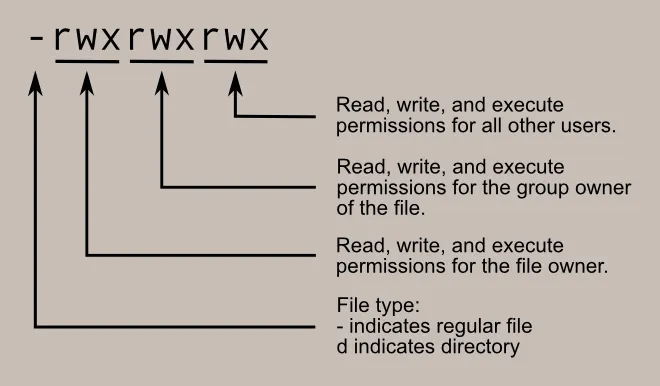
chmod – File permissions change karne ke liye (chmod 755 file.txt).
chown – File owner change karne ke liye (chown user:user file.txt).
chgrp – File ka group change karne ke liye (chgrp groupname file.txt).
umask – Default permissions dekhne ya set karne ke liye (umask 022).
ls -l – Files ki permissions check karne ke liye.
4. Process Management Commands
ps – Running processes dekhne ke liye.
top – System performance aur running processes dikhata hai.
htop – top ka interactive version (pehle htop install karna padega).
kill – Process ko terminate karne ke liye (kill PID).
pkill – Process name se terminate karne ke liye (pkill firefox).
jobs – Background jobs dekhne ke liye.
bg – Background job resume karne ke liye.
fg – Background job ko foreground me laane ke liye.
5. User Management Commands
whoami – Current user ka naam dikhata hai.
who – Logged-in users ka list dikhata hai.
id – User ID aur Group ID dikhata hai.
adduser – Naya user create karne ke liye (sudo adduser username).
passwd – Password change karne ke liye (passwd).
su – Doosre user ke account me switch karne ke liye (su username).
sudo – Superuser privileges use karne ke liye (sudo command).
6. Networking Commands
ifconfig – IP address aur network interface details dikhata hai (deprecated, ab ip a use hota hai).
ip a – Current IP address dikhata hai.
ping – Kisi network host ko ping karne ke liye (ping google.com).
netstat – Network connections dikhata hai.
curl – URL se data fetch karne ke liye (curl example.com).
wget – Web se files download karne ke liye (wget url).
7. System Information Commands
df -h – Disk space usage dikhata hai.
du -sh – Directory ka size check karne ke liye.
uptime – System kab se chal raha hai ye dikhata hai.
uname -a – System ke bare me full details dikhata hai.
1. File & Directory Management
ls -lah – Detailed list with human-readable sizes.
tree – Directory structure tree format me dikhata hai.
find / -type f -size +100M – 100MB se bade files dhoondhne ke liye.
find /var/log -type f -mtime -7 – Last 7 din me modify hue log files dhoondhne ke liye.
du -sh * | sort -rh | head -10 – Top 10 sabse bade files/directories dikhata hai.
rsync -avz source/ destination/ – Files aur directories sync karne ke liye.
stat file.txt – File ki details jaise permissions, timestamps dekhne ke liye.
basename /path/to/file – Sirf filename extract karne ke liye.
dirname /path/to/file – Sirf directory path extract karne ke liye.
inotifywait -m /home/user – Directory me real-time changes monitor karne ke liye.
2. File Permissions & Ownership
chmod 400 private-key.pem – File ko sirf read-only banane ke liye.
chown -R user:group folder/ – Folder ka ownership change karne ke liye.
umask 027 – Default permissions set karne ke liye.
setfacl -m u:username:rwx file – Extra user ko file access dene ke liye.
getfacl file – ACL permissions dekhne ke liye.
3. Process Management
ps aux –sort=-%mem | head – Memory-consuming top processes dikhane ke liye.
pgrep apache – Process ID dhoondhne ke liye.
pkill -9 process_name – Process forcefully terminate karne ke liye.
nohup command & – Process ko background me run karne ke liye.
strace -p PID – Process ka system calls trace karne ke liye.
lsof -p PID – Process ka open files dekhne ke liye.
uptime – System uptime aur load average dikhata hai.
time command – Command execution ka time calculate karta hai.
watch -n 1 free -m – Memory usage real-time monitor karne ke liye.
nice -n 10 process_name – Process priority change karne ke liye.
4. User Management
whoami – Current user dekhne ke liye.
id username – User ka UID, GID, aur groups dekhne ke liye.
groups username – User ke groups dikhata hai.
useradd -m username – Naya user create karne ke liye.
passwd username – User ka password set karne ke liye.
usermod -aG sudo username – User ko sudo access dene ke liye.
deluser username – User delete karne ke liye.
last – System pe login history dekhne ke liye.
who – Logged-in users dikhane ke liye.
w – Users ki activity aur system load dikhata hai.
5. Networking
ip a – Network interfaces aur IPs dikhata hai.
ifconfig – IP address aur network details (deprecated).
netstat -tulnp – Listening ports aur running services dikhata hai.
ss -tulnp – netstat ka faster alternative.
tcpdump -i eth0 – Live network traffic capture karne ke liye.
traceroute google.com – Network path trace karne ke liye.
mtr google.com – Advanced network diagnostics.
dig google.com – DNS records dikhata hai.
nslookup google.com – DNS lookup karne ke liye.
curl -I google.com – HTTP headers dikhane ke liye.
6. System Monitoring & Performance
top – Real-time process monitoring.
htop – top ka interactive version.
free -m – RAM usage dikhane ke liye.
vmstat 1 – CPU, memory, disk activity dikhata hai.
iostat -x 1 – Disk I/O performance monitor karta hai.
iotop – Real-time disk usage dekhne ke liye.
df -h – Disk usage check karne ke liye.
du -sh /home/user – Specific directory ka size dekhne ke liye.
uptime – System running time dikhata hai.
sar -u 1 5 – CPU usage monitor karne ke liye.
7. Security & Logs
sudo dmesg | tail – Kernel logs dekhne ke liye.
journalctl -xe – System logs aur errors check karne ke liye.
auth.log – Authentication logs (/var/log/auth.log).
iptables -L – Firewall rules dekhne ke liye.
fail2ban-client status – Brute-force attack protection status dekhne ke liye.
auditctl -l – Audit logs configure karne ke liye.
chkrootkit – Rootkit detection ke liye.
rkhunter –check – Rootkit scanning karne ke liye.
history | grep sudo – Sudo commands ki history check karne ke liye.
passwd -l username – User account disable karne ke liye.
8. Disk & File System Management
fdisk -l – Disk partitions dikhane ke liye.
mkfs.ext4 /dev/sdb1 – Partition format karne ke liye.
mount /dev/sdb1 /mnt – Partition mount karne ke liye.
umount /mnt – Partition unmount karne ke liye.
fsck /dev/sdb1 – Filesystem errors check karne ke liye.
9. Archiving & Compression
tar -cvf archive.tar directory/ – Folder ko .tar file me compress karne ke liye.
tar -xvf archive.tar – .tar file extract karne ke liye.
gzip file.txt – File compress karne ke liye.
gunzip file.txt.gz – .gz file decompress karne ke liye.
zip -r archive.zip folder/ – Zip archive banane ke liye.
unzip archive.zip – Zip file extract karne ke liye.
10. Scripting & Automation
echo ‘command’ | at now +5 minutes – 5 min baad command execute karne ke liye.
crontab -e – Cron jobs set karne ke liye.
awk ‘{print $1}’ file.txt – Column extract karne ke liye.
sed ‘s/old/new/g’ file.txt – Text replace karne ke liye.

.PNG?raw=true)
